Torbutton
Torbutton is the component in
Tor Browser Bundle that takes care of application-level security and privacy concerns in Firefox. To keep you safe, Torbutton disables many types of active content.
Now that the
Tor Browser Bundle includes a patched version of Firefox, and because we don't have enough developer resources to keep up with the accelerated Firefox release schedule, the toggle model of Torbutton is
no longer recommended.
Users should be using Tor Browser Bundle, not installing Torbutton themselves. Current stable version:1.4.6 (31 May 2012)
Current alpha version:None
Maintainer: Mike Perry
Expert Install (Stable): Click to
install from this website. Verify the
signature.
Past Releases: Tor Archive Developer Documentation: Torbutton Design Document and
Slides (Not actively updated) Source: You can
browse the repository or simply unzip the xpi.
Bug Reports: Torproject Bug Tracker
What is the Tor Browser Bundle (TBB)?
The
Tor software protects you by bouncing your communications around a distributed network of relays run by volunteers all around the world: it prevents somebody watching your Internet connection from learning what sites you visit, it prevents the sites you visit from learning your physical location, and it lets you access sites which are blocked.
The
Tor Browser Bundle lets you use Tor on Windows, Mac OS X, or Linux without needing to install any software. It can run off a USB flash drive, comes with a pre-configured web browser to protect your anonymity, and is self-contained.
Quick videos on how to use TBB
How to download and use Tor Browser in different operating systems:
How to verify the digital signatures of Tor Browser in different operating systems:
How to
find and use bridges and unpublished relays in Tor Browser in all operating systems:
To start using the Tor Browser Bundle download the file for your preferred language. This file can be saved wherever is convenient, e.g. the Desktop or a USB flash drive.
Tor Browser Bundle for Windows with Firefox Aurora (version 2.2.37-1)
The Tor IM Browser Bundle has been
temporarily discontinued.
BETA: Tor Browser Bundle for Intel Mac OS X 10.5 and higher with Firefox Aurora (version 2.2.37-1, 28 MB)
BETA: Tor Browser Bundle for Linux with Firefox Aurora (version 2.2.37-1 (32-bit), 2.2.37-1 (64-bit), 24 MB)
ALPHA: Tor Browser Bundle alpha versions for Windows (2.3.12-alpha-2), Linux 32-bit (2.3.12-alpha-2) and 64-bit (2.3.12-alpha-2), and Intel Mac OS X 10.6 and higher (2.3.12-alpha-2) with Firefox
See our instructions on
how to verify package signatures, which allows you to make sure you've downloaded the file we intended you to get. Also, note that the Firefox Aurora in our bundles is
modified from the
default Firefox Aurora; we're currently working with Mozilla to see if they want us to change the name to make this clearer.
Download the file above, save it somewhere, then click on it. Mac OS X will automatically unarchive it and you will have a TorBrowser application in your chosen language (for example, TorBrowser_en-US.app). Click the TorBrowser application to launch Vidalia. Once Vidalia connects to Tor, it will launch Firefox Aurora.

Download the architecture-appropriate file above, save it somewhere, then run one of the following two commands to extract the package archive:
tar -xvzf tor-browser-gnu-linux-i686-2.2.37-1-dev-LANG.tar.gz or
tor-browser-gnu-linux-x86_64-2.2.37-1-dev-LANG.tar.gz (where
LANG is the language listed in the filename).
Once that's done, switch to the Tor browser directory by running:
cd tor-browser_LANG (where
LANG is the language listed in the filename).
To run the Tor Browser Bundle, execute the
start-tor-browser script:
./start-tor-browser This will launch Vidalia and once that connects to Tor, it will launch Firefox.
Do not unpack or run TBB as root.Download the file above, and save it somewhere, then double click on it. Click on the button labelled
"..." (1) and select where you want to save the bundle then click
OK (2). At least 50 MB free space must be available in the location you select. If you want to leave the bundle on the computer, saving it to the Desktop is a good choice. If you want to move it to a different computer or limit the traces you leave behind, save it to a USB disk.
Click
Extract (3) to begin extraction. This may take a few minutes to complete.

Once extraction is complete, open the folder
Tor Browser from the location you saved the bundle.
Double click on the
Start Tor Browser (4) application (it may be called
Start Tor Browser.exe on some systems.)
The Vidalia window will shortly appear.

Once Tor is ready, Firefox will automatically be opened. Only web pages visited through the included Firefox browser will be sent via Tor. Other web browsers such as Internet Explorer are not affected. Make sure that it says
"Tor Enabled" (5) in the bottom right corner before using it. To reduce the risk of confusion, don't run Firefox while using the Tor Browser Bundle, and close existing Firefox windows before starting.
If you installed the Tor IM Browser Bundle, the Pidgin instant messaging client will also be automatically opened.
Once you are finished browsing, close any open Firefox windows by clicking on the

(6). For privacy reasons, the list of webpages you visited and any cookies will be deleted.

With the Tor Browser Bundle, Vidalia and Tor will automatically close. With the Tor IM Browser Bundle you need to also close Pidgin by right-clicking on the Pidgin icon (7), and choosing Quit (8).

To use the Tor Browser Bundle or Tor IM Browser Bundle again, repeat the steps in
"Usage".
Remember that Tor anonymizes the origin of your traffic, and it encrypts everything inside the Tor network, but
it can't encrypt your traffic between the Tor network and its final destination. If you are communicating sensitive information, you should use as much care as you would on the normal scary Internet — use HTTPS or other end-to-end encryption and authentication.
The Tor Browser Bundle is under development and not yet complete. To discuss improvements and submit comments, please use the
tor-talk mailing list.
What is Tor and why do I need it? To learn more about Tor, visit the
Tor Project website.
What is in the Tor Browser Bundle? It contains Tor, Vidalia, Firefox, and Torbutton (
learn more).
What is in the Tor IM Browser Bundle? It contains Tor, Vidalia, Firefox, Torbutton, Pidgin and OTR (
learn more).
How can I make my own bundle? To download the source code and learn how to build the bundle yourself, read the
build instructions.
Tor Browser Bundle is partially based on
Mozilla Firefox Aurora, Portable Edition from
PortableApps.com.


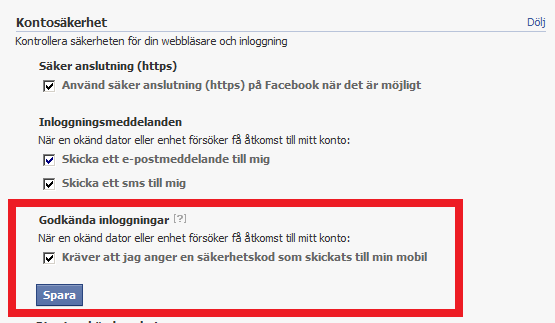 Där kryssar du i rutan och trycker på spara så får du sedan ett SMS innehållandes en engångskod (bekräftelsekod) till det mobilnummer som du troligtvis angett tidigare:
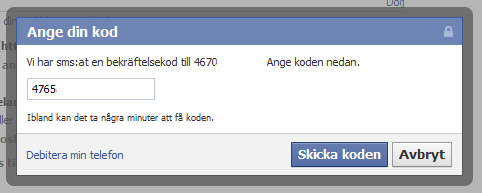 Och sedan är allt klart: